

Google officially launched a major update to Android 16 on Tuesday, introducing a suite of artificial intelligence-powered tools and enhanced system customization. Initially rolling out to Pixel devices, this release signals a strategic shift for Google as it moves toward a more frequent, agile release schedule rather than relying on a single annual update.
AI-Powered Notifications and Customization
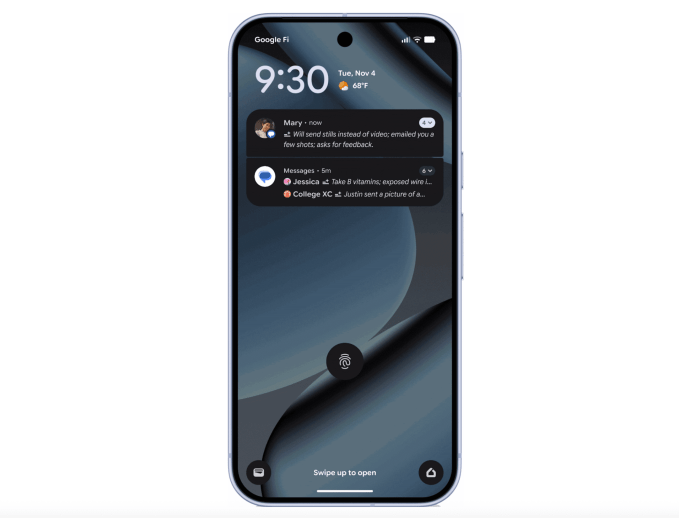
The core of the Android 16 update centers on intelligence and personalization. Users now benefit from AI-powered notification summaries, which distill lengthy group chats and complex message threads into concise, glanceable insights. Complementing this is the new “Notification organizer,” designed to automatically categorize and silence low-priority alerts—such as social media updates, news, and promotional content.
Device aesthetics also receive a significant boost. Android 16 introduces expanded customization options, including support for custom icon shapes and themed icons. Furthermore, a new system-wide feature allows users to force a dark mode onto light-themed applications, even those that lack native support for dark aesthetics.
Advanced Parental Controls
Google has integrated more robust parental controls directly into the Android Settings menu. Parents can now manage their children’s digital footprint with greater precision, including setting strict screen time limits, scheduling downtime, and monitoring specific app usage patterns.
New Features Across the Android Ecosystem
Beyond the primary Android 16 features, Google is deploying several enhancements applicable to the broader Android ecosystem:
- Call Reason: A new beta feature that allows users to tag calls to saved contacts as “urgent.” This status appears on the recipient’s screen and remains in the call history for missed communications.
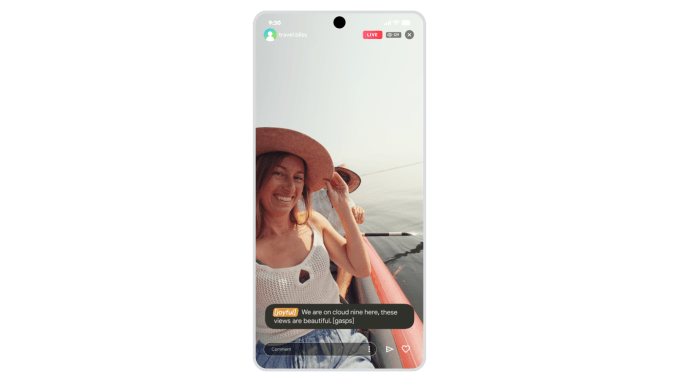
- Expressive Captions: This feature adds emotional context to video messages and social media posts by tagging speech with descriptors like [joyful] or [sad], ensuring accessibility even when audio is muted.
- Enhanced Group Chat Security: Users now receive alerts when invited to group chats by unknown numbers. These alerts provide crucial details, allowing the user to report, block, or leave the conversation immediately.
- Chrome Pinned Tabs: Chrome now supports pinned tabs that function identical to the desktop version, ensuring important pages remain accessible at the front of the browser.
- Circle to Search Scam Detection: The Circle to Search tool has been upgraded to analyze suspicious messages. An AI Overview will now flag potential scams when users circle or highlight text.
Accessibility Improvements
Google continues its focus on inclusivity with significant updates to its accessibility suite. The “Guided Frame” feature in the Pixel camera app now offers detailed scene descriptions—such as identifying specific clothing colors and actions—rather than simple face detection. Additionally, Voice Access is now more intuitive, allowing users to initiate hands-free control by simply saying, “Hey Google, start Voice Access.” Finally, the rollout of Fast Pair for hearing aids begins today, starting with devices from Demant brands, including Oticon, Sonic, and Bernafon.