
Google has officially integrated Gemini AI into Gmail to streamline the meeting scheduling process. Announced this Tuesday, the new “Help me schedule” feature analyzes your Google Calendar availability to suggest optimal meeting times directly within the email compose window, eliminating the need to toggle between different applications.
How the AI-Powered Scheduling Works
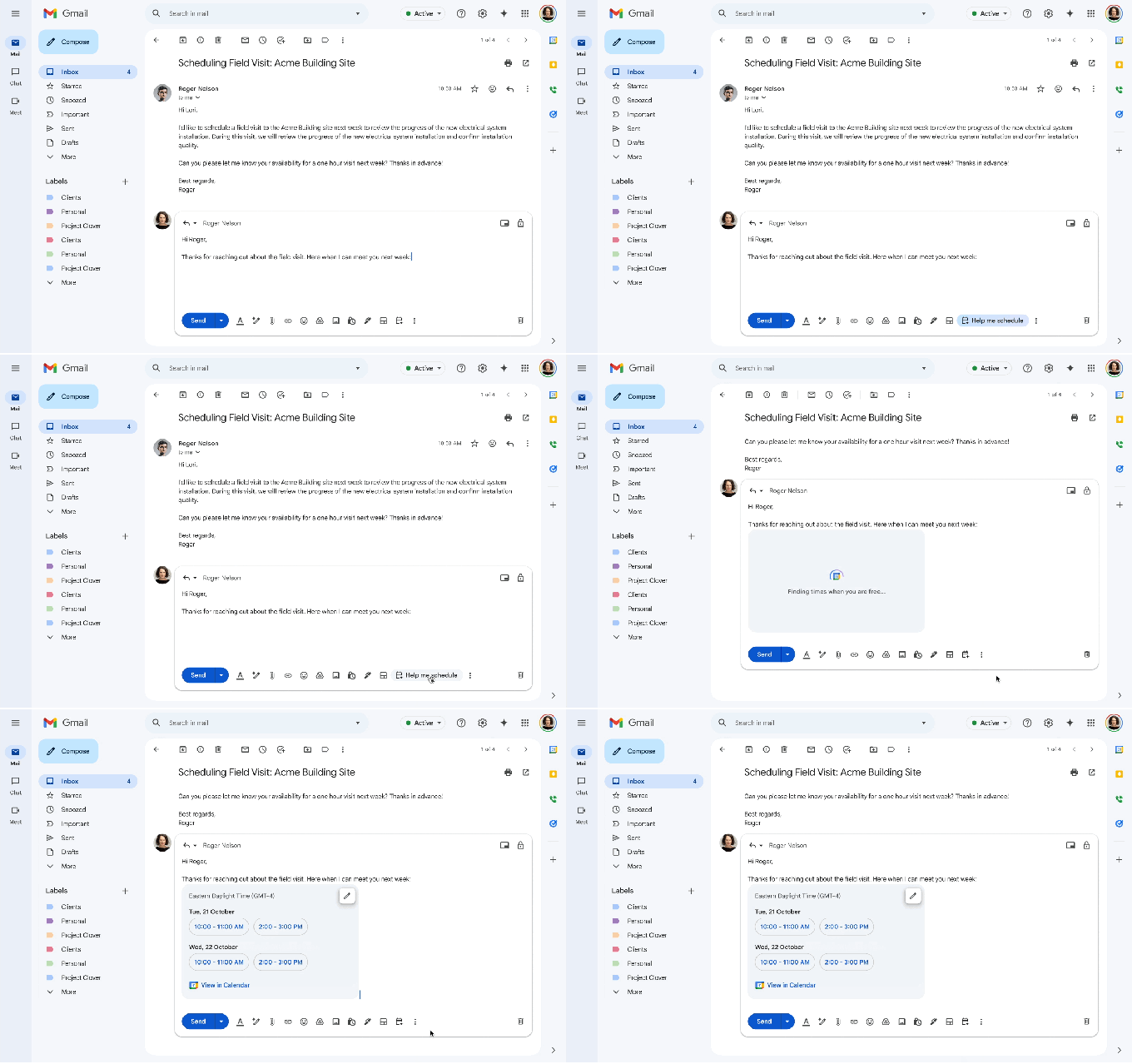
The workflow is designed for efficiency: users simply click the “Help me schedule” button located beneath the email composition area. The AI then generates a list of open timeslots based on the user’s existing calendar data. Users maintain full control, with the ability to edit or remove specific slots before inserting them into the message. Once the recipient selects a time, the calendar invitation is automatically generated and synchronized across both parties’ calendars.
Currently, Google specifies that this feature is optimized exclusively for one-on-one meetings rather than group sessions or complex multi-contact scheduling.
Context-Aware Suggestions vs. Standard Tools
While the market is saturated with automated scheduling tools such as Calendly, Doodle, and Zoom, Google differentiates its offering through Gemini’s contextual understanding. Unlike traditional tools that merely look for gaps in a calendar, Gemini interprets the content of the email conversation. For example, if an email requests a 30-minute meeting “next week,” the assistant proactively filters suggestions to offer only 30-minute blocks within that specific timeframe.
This represents a significant evolution from Google’s previous appointment scheduling features, which operated without AI integration and lacked direct connectivity to the Gmail interface.
Expanding the Google Workspace AI Ecosystem
The rollout of “Help me schedule” is part of a broader push to embed artificial intelligence deeper into daily workspace tasks. This update follows a wave of product announcements, which include:
- The debut of the “Nano Banana” image editing model.
- New Gemini-powered capabilities for Google Slides.
- The ability to share custom AI assistants, known as Gems, with team members.
- Advanced AI video tools integrated into Google Vids.
- New formatting options within NotebookLM.
In addition to the scheduling update, Google confirmed that Google Keep reminders will now automatically migrate to Google Tasks, further unifying the company’s productivity suite.