

Apple officially unveiled macOS Tahoe during Monday’s WWDC conference, signaling a major shift in desktop computing. The update introduces deep Apple Intelligence integration, enhanced iPhone continuity features, and a reimagined Spotlight search, all wrapped in a fresh design language.
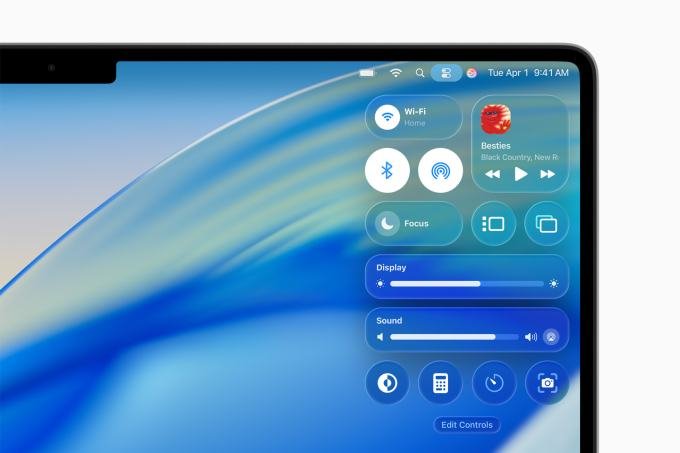
Liquid Glass Design and Customization
The standout visual change is the “Liquid Glass” design aesthetic. Mirroring the visual style of iOS 26, the interface adopts a more transparent, reflective, and glass-like appearance. Beyond the aesthetics, Apple is finally addressing long-standing user requests for greater personalization: users can now customize folder icons with specific colors, moving away from the traditional macOS look.
Advanced iPhone Continuity
macOS Tahoe bridges the gap between desktop and mobile more than ever. The operating system now supports Live Activities directly from iOS, allowing users to track real-time updates—such as food delivery status or ride-sharing progress—directly on their Mac. Furthermore, the Mac is gaining a dedicated Phone app for the first time, introducing features like Call Screening, Hold Assist, and Live Translation for Phone, Messages, and FaceTime.
Spotlight: The AI-Driven Command Center
Perhaps the most functional upgrade lies within Spotlight. Powered by Apple Intelligence, the new search tool predicts user intent, suggesting actions based on current workflows. Users can now perform complex tasks without opening native applications. During the WWDC demo, an Apple executive demonstrated drafting and sending an entire email directly from the Spotlight interface.
To further boost efficiency, the updated Spotlight introduces “quick keys.” These customizable character strings trigger specific actions; for instance, typing “AR” can instantly create a reminder, while “SM” can initiate a message.
Feature Parity with iOS 26
macOS Tahoe incorporates a suite of features arriving alongside iOS 26, including:
- Genmoji and Image Playground updates.
- AI-supported reminders.
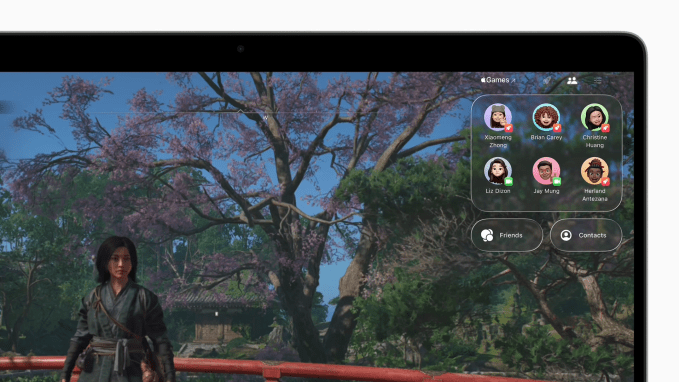
- A dedicated Apple Games app.
- Enhanced Messages features, including polls and custom backgrounds.
- A redesigned FaceTime landing page.
- The introduction of the Journal app to the desktop environment.
Release Schedule
Apple confirmed that macOS Tahoe will launch for the general public this fall. Those eager to test the features early can access a public beta starting next month, while developers can begin working with an early version of the software immediately.