
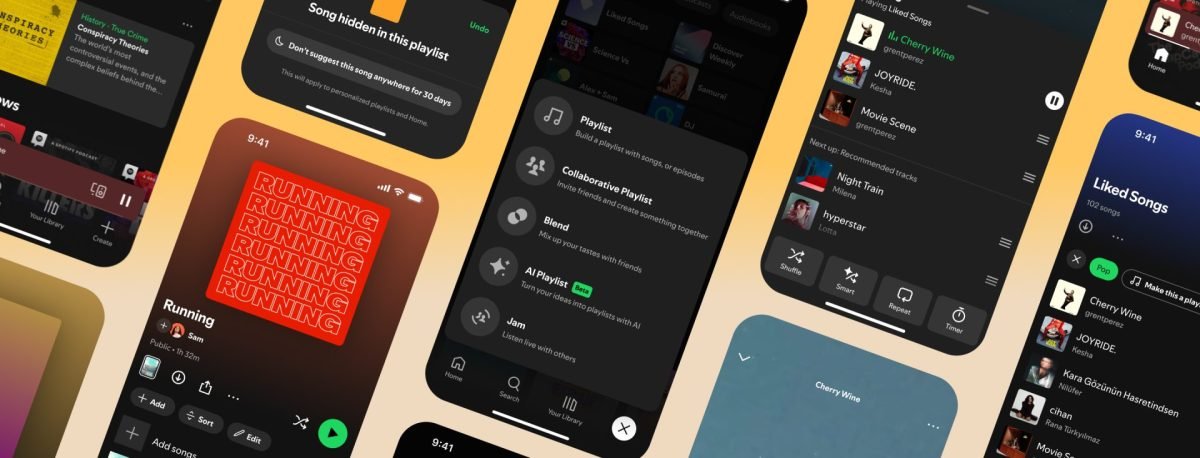
Spotify officially launched a significant app update on Wednesday, May 7, 2025, aimed at shifting the balance of power from algorithmic automation back to the listener. By introducing a suite of granular management tools, the platform now allows users to exert greater influence over their queues, playlist organization, and automated recommendations.
Revamping the Queue for Premium Listeners
The update brings a substantial redesign to the Spotify Queue for Premium subscribers. Users can now access essential playback controls—including Shuffle, Smart Shuffle, Repeat, and Sleep Timer—with greater ease. For those who prefer a purely manual experience, the company has confirmed that Smart Shuffle and Autoplay can now be toggled off entirely within the app’s settings.
Furthermore, Premium users gain unprecedented transparency into their listening sessions. The app will now display which tracks Spotify intends to play automatically after a user’s chosen queue ends, allowing subscribers to prune or approve selections before they begin.
Advanced Playlist Management and Curation
Spotify is streamlining how users interact with their collections through a redesigned interface. At the top of every playlist, users will find dedicated buttons for “Add,” “Edit,” and “Sort,” facilitating faster title changes, cover art updates, and track reordering.
For listeners in the U.S., U.K., Canada, Australia, Ireland, New Zealand, and South Africa, a new filtering feature allows users to sort their “Liked” songs by genre and instantly convert those filtered tracks into a standalone playlist.
Intuitive “Hide” Controls and New Discovery Tools
Managing unwanted tracks is becoming more intuitive. A refreshed “Hide” button, now more prominently positioned, allows users to remove songs from playlists across all devices. This is set to be complemented by an upcoming 30-day “Snooze” feature, which will temporarily exclude specific tracks from algorithmic recommendations.
Centralized Creation Hub
To reduce clutter, Spotify has relocated its curation tools to a single “Create” button located at the bottom right of the mobile interface. This hub provides immediate access to:
- Standard playlist creation
- Collaborative playlist setup
- Blend sessions
- AI Playlist features (for Premium subscribers)
- Jam sessions for real-time group listening
As part of this UI reorganization, the “Your Library” tab has been repositioned as the third option in the bottom navigation bar. These updates are rolling out gradually to both free-tier and Premium users worldwide, as detailed in the official Spotify announcement.