
The Awake app launched this Monday for iOS 26 users, offering a high-stakes solution for chronic oversleepers. Developed by Leo Mehlig, the creator of the popular Structured planner, the app forces users to complete interactive physical and mental missions to silence their morning alarms, effectively ending the habit of hitting the snooze button.
Gamified Wake-Up Routines
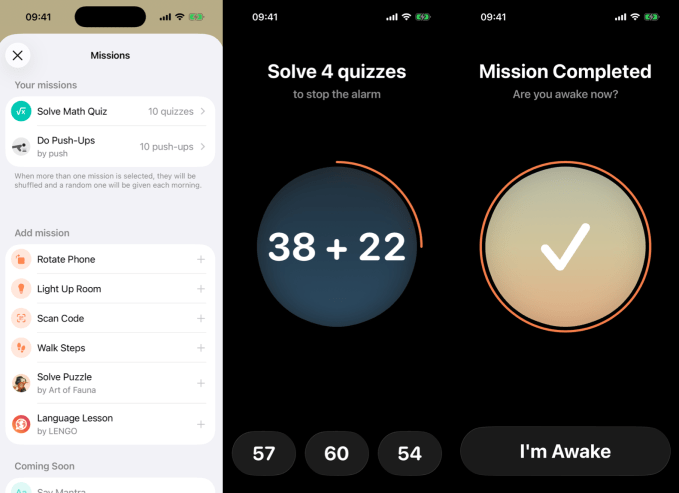
Unlike standard alarms that stop with a single tap, Awake requires genuine engagement. Once the alarm triggers, users must successfully navigate a series of challenges. These include solving complex math problems, completing puzzles, performing physical exercises like push-ups, or even engaging in language lessons. By stimulating the brain and body simultaneously, the app ensures users are fully alert before they can disable the sound.
Beyond the Alarm: Productivity Features
Awake differentiates itself from competitors like Alarmy or Mathe Alarm by acting as a morning productivity hub. Key features include:
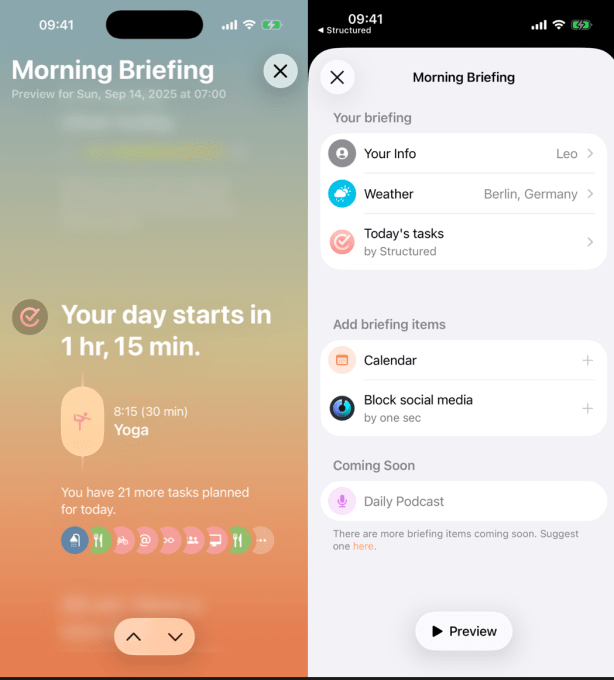
- Morning Briefing: A custom summary of weather forecasts and calendar events prepared the night before.
- Social Media Blocking: Integration that restricts access to distracting apps immediately after waking.
- Sleep Planning: A functional tool that calculates the optimal bedtime based on your desired wake-up time to improve overall sleep hygiene.
Built for iOS 26
The development of the app was accelerated by Apple’s introduction of the Alarm Kit framework in iOS 26. This framework allows developers to utilize full-screen alerts and sophisticated alarm controls that were previously unavailable. Mehlig noted that the demand from the Structured user base made this project a priority once the necessary technical tools were released by Apple.
Pricing and Future Updates
Awake is free to download, with a premium subscription available for $6.49 per month or $19.99 per year. Premium users gain access to advanced missions, such as scanning QR codes, turning on smart lights, walking a set number of steps, or reciting mantras.
Future iterations of the app will focus on the “Wake Up Check” feature. This system will monitor user movement via the iPhone’s step counter after a mission is completed. If the app detects a lack of activity, it will send a follow-up notification or trigger a secondary alarm to prevent the user from drifting back into sleep.