
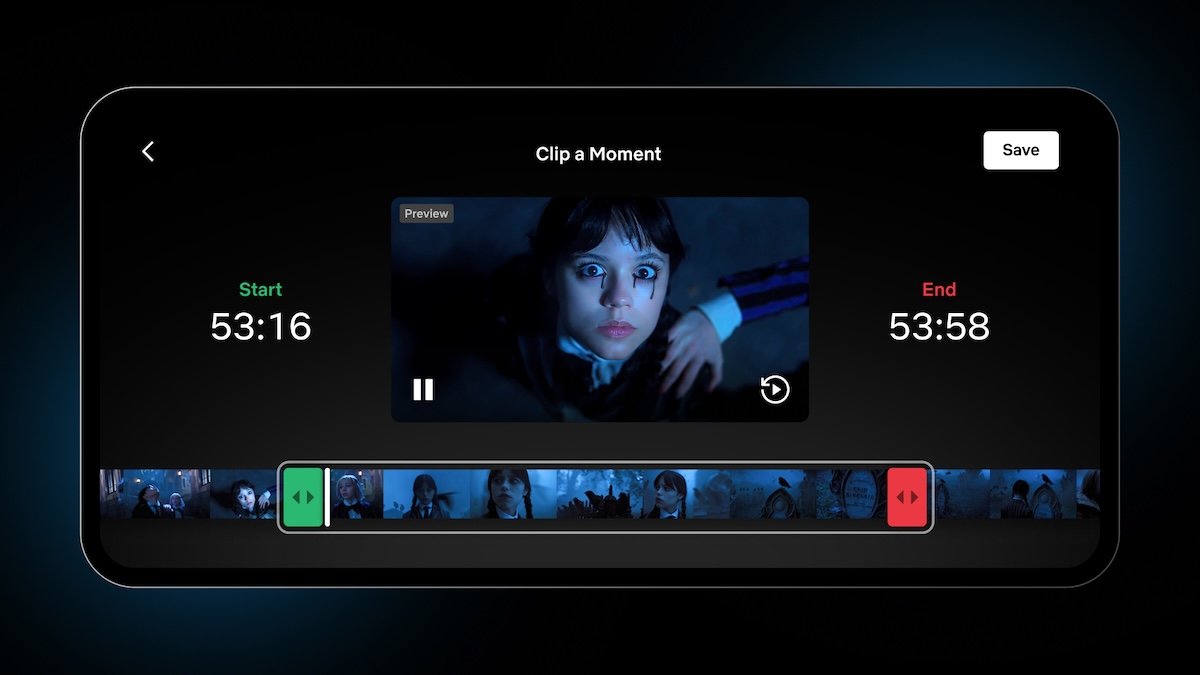
Netflix has officially enhanced its “Moments” feature, granting mobile users precise control over scene clipping. Announced this Wednesday, the update allows subscribers to define both the start and end points of any clip saved from the platform’s library, moving beyond the previous limitation of only setting a start time.
Customizing Your Netflix Clips
This functionality empowers users to curate content with greater accuracy. Whether you want to capture a fleeting reaction or a longer cinematic sequence, you can now adjust the duration of your clips to match your preference. This official update is designed to streamline the way viewers interact with their favorite shows and movies.
How to Use the New Moments Feature
The process remains intuitive for mobile users:
- Open any movie or show within the Netflix app.
- Tap the screen and select the “Clip” button.
- Adjust the start and end sliders to capture the specific sequence.
- Save the clip to your “My Netflix” tab for instant access later.
Once saved, these clips are easily shareable across social media platforms. When followers engage with your shared content, they can click the post to be redirected directly to that specific scene within the Netflix application, creating a seamless bridge between social discovery and streaming.
Strategic Timing: The “Wednesday” Connection
The rollout of this feature aligns with the highly anticipated release of Part 2 of Wednesday Season 2. By deploying these improved editing tools alongside the hit series—which includes a guest appearance by Lady Gaga—Netflix is betting on a surge in fan-driven social media engagement. Data from the company confirms that the Moments feature is already seeing widespread adoption, with members utilizing it across thousands of different titles to preserve and share their top streaming highlights.