
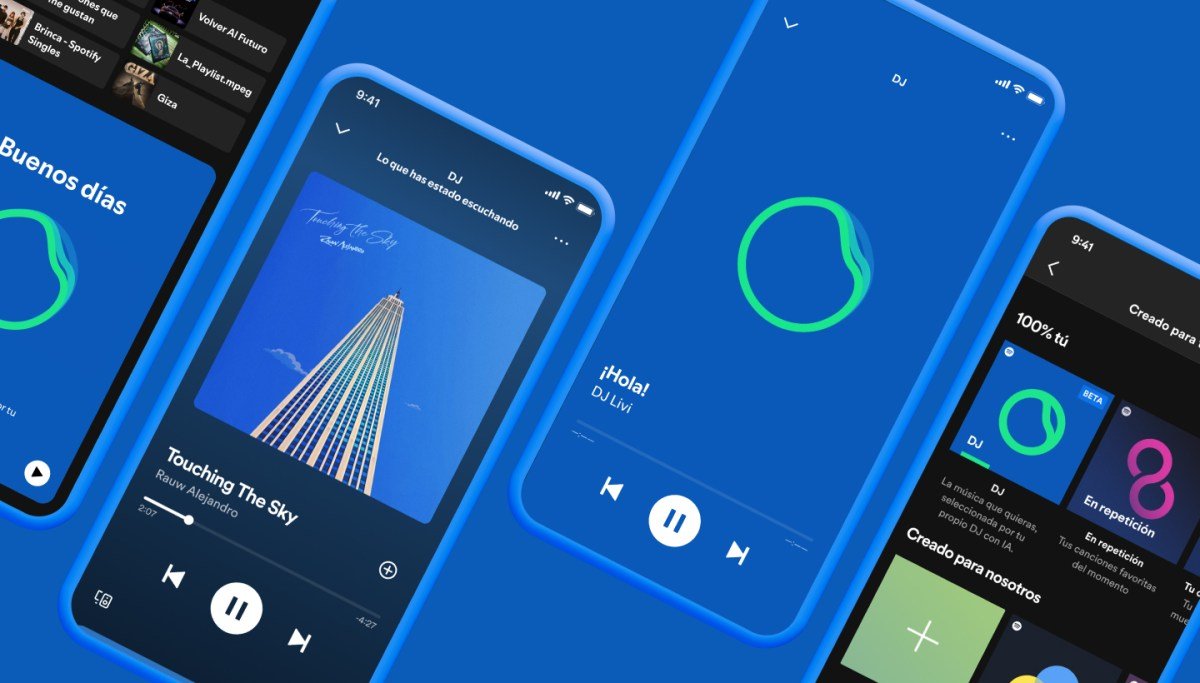
Spotify has officially expanded its AI DJ feature beyond English, introducing “Livi,” a Spanish-speaking AI guide designed to offer personalized music recommendations. Following significant demand from Latin American users, the feature is now rolling out to Spotify Premium subscribers across multiple markets, including Mexico, Argentina, Colombia, and several other countries in the region.

A Realistic Voice for Personalization
Much like the original AI DJ “X,” which is based on the voice and personality of Spotify employee Xavier “X” Jernigan, the Spanish version is modeled after a real person. Olivia “Livi” Quiroz Roa, a senior music editor based in Mexico City, was selected following an extensive casting process. Spotify noted that testers found her voice remarkably relatable, creating the experience of receiving music recommendations from a friend rather than a machine.
The technology behind the DJ combines advanced AI models from OpenAI with Sonantic, the AI voice platform acquired by Spotify in 2022. This integration allows the AI to mimic natural speech patterns, including local slang and regional expressions.
Driving Engagement Through Innovation
Since its launch last year, the AI DJ feature has become a cornerstone of Spotify’s strategy to increase platform engagement. Internal data reveals that users of the DJ feature listen to significantly more music, with usage growing by over 200% in the past year alone. For the company, this is more than just an experiment; it is a vital tool for deepening user retention and discovery.
Availability and How to Access
The introduction of “Livi” comes after a 215% surge in social media conversations regarding a Spanish-language version of the DJ. Currently categorized as a “beta” test, the feature is available to Premium listeners in the following regions:
- Mexico
- Argentina, Bolivia, Chile, Colombia, and Peru
- Ecuador, Paraguay, Uruguay, and Venezuela
- Costa Rica, Dominican Republic, El Salvador, Guatemala, Honduras, Nicaragua, and Panama
Users are not forced to choose one or the other; the platform allows for flexibility. Premium subscribers can access the feature by navigating to the “Search” tab and selecting “DJ.” To switch between the English-speaking “X” and the Spanish-speaking “Livi,” users simply need to tap the three-dot menu within the DJ card to toggle their preference.